Introduction to Hike ecommerce
Hike eCommerce: Your All-in-One Online Store Add-On for Hike POS
Welcome
to the future of unified retail! This help article will guide you
through everything you need to know about Hike eCommerce, the powerful
online store add-on that seamlessly integrates with your Hike Point of
Sale system.
What is Hike eCommerce?
Hike
eCommerce is a fully-integrated online store solution built
specifically for brick-and-mortar retailers using Hike POS. It's not a
separate platform—it's a native add-on that extends your physical store
into the digital world, allowing you to sell products online while
maintaining complete synchronization with your in-store operations.
Think
of it as your second storefront that never closes, powered by the same
inventory, customer data, and management tools you already use in Hike
POS.
How It Works with Your Hike POS: The Seamless Connection
The magic of Hike eCommerce lies in its real-time, two-way synchronisation with your Hike POS. Here's how the integration works:
text
[Physical Store: Hike POS] ←→ [Real-Time Cloud Sync] ←→ [Online Store: Hike eCommerce]
↑ ↑ ↑
Inventory Inventory Inventory
Customers Customers Customers
Sales Data Sales Data Sales Data
Product Catalog Product Catalog Product Catalog
↑ ↑ ↑
Inventory Inventory Inventory
Customers Customers Customers
Sales Data Sales Data Sales Data
Product Catalog Product Catalog Product Catalog
Pricing and Use:
Currently, Hike eCommerce will be available as an add-on for Hike users with the Plus plan. It is not available on the Essential plan.
If you are on the Plus plan, you will find the option to activate the Hike eCommerce from Store set-up >> Add-on.
Currently, Hike eCommerce will be available as an add-on for Hike users with the Plus plan. It is not available on the Essential plan.
If you are on the Plus plan, you will find the option to activate the Hike eCommerce from Store set-up >> Add-on.
For
Hike Plus plan customers, the eCommerce will be free for 14 days after activating it from the Add-on page. After
14 days, they can continue using the eCommerce add-on at the same price as
your outlet price. The eCommerce will be available on a monthly or yearly plan based on your current Hike subscription.
If you are on the Plus monthly plan, the eCommerce will be available on the monthly plan.
If you are on the Plus yearly plan, the eCommerce will be available on the yearly plan.
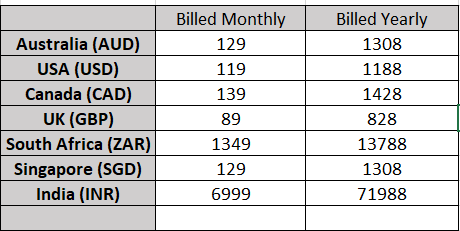
You will be able to see the price of the e-commerce on the Add-on page when activating the e-commerce. There are no transaction fees or commissions on sales—you keep 100% of your revenue.
If you are on the Plus monthly plan, the eCommerce will be available on the monthly plan.
If you are on the Plus yearly plan, the eCommerce will be available on the yearly plan.
You will be able to see the price of the e-commerce on the Add-on page when activating the e-commerce. There are no transaction fees or commissions on sales—you keep 100% of your revenue.
Please check the price for each region below.
Key Integration Points
Single Product Catalogue: Products you add or edit in Hike POS automatically appear in your online store (when enabled).
Live Inventory Sync: When
a sale happens online, your in-store inventory updates instantly. When
you sell in-store, your online stock levels adjust automatically. No
more double-selling!
Unified Customer Database: Customer
profiles created online are available in your POS, and vice-versa, with
complete purchase history across both channels.
Centralized Reporting: View all sales—online and in-store—from your single Hike POS dashboard.
One Login Access: Manage everything with your existing Hike POS credentials.
Storefront & Design
55+ Professionally Designed Themes: Choose from responsive, mobile-friendly templates for different retail verticals (fashion, home goods, food, gifts, etc.)
No-Code Website Builder: Drag-and-drop customization without needing web development skills
Brand Customization: Easily add your logo, brand colours, and styling
Editable HTML/CSS: For advanced users who want complete design control
Shopping & Checkout
Secure Shopping Cart: 256-bit SSL encryption protects customer data
Multiple Payment Gateways: Accept payments via Stripe, PayPal Express, Zip Pay, and more
Zero Platform Commissions: Unlike marketplaces, you keep 100% of your profits—no fees on orders
Flexible Shipping Options: Set flat rates, weight-based rates, or offer free shipping
Guest & Account Checkout: Customers can checkout quickly or create accounts for faster future purchases
Inventory & Order Management
Automatic Stock Updates: Real-time synchronization prevents overselling
Unified Order Management: Process online and in-store orders from the same interface
Central Product Management: Update descriptions, prices, and images once—changes reflect everywhere
Collection Management: Organize products by category, season, brand, or custom groupings
Customer & Marketing Tools
Omnichannel Customer Profiles: Track purchase history across all channels in one place
Unified Loyalty Programs: Customers earn and redeem points both online and in-store
Cross-Channel Promotions: Create discount offers and coupon codes that work everywhere
SEO-Optimized: Built-in search engine optimisation helps customers find you online
Support & Security
Single Point of Support: One team for both POS and eCommerce questions
Automatic Updates: New features delivered seamlessly as part of your subscription
Dedicated Account Managers: Available for personalized setup and training
How Customers Can Use Hike eCommerce to Expand Their Business
For Retailers New to Online Selling:
Start Small: Begin by listing your best-selling items online
Test Markets: Reach customers in different geographic areas without opening new physical locations
24/7 Revenue: Accept orders while your physical store is closed
Build Your Brand: Create a professional online presence that complements your physical store
For Established Online Sellers:
Simplify Operations: Replace disjointed systems with one unified platform
Improve Accuracy: Eliminate manual inventory updates and spreadsheets
Enhance Customer Experience: Offer consistent pricing, promotions, and loyalty benefits across all channels
Reduce Costs: Eliminate third-party marketplace fees and multiple software subscriptions
Local Delivery: Set up delivery zones and schedules for your community
Seasonal Pop-Ups: Launch temporary online stores for holidays or special events
Getting Started Overview
Prerequisites:
Active Hike POS subscription with Plus plan
Product images and descriptions ready
Business information (logo, brand colours, etc.)
Images to add on your eCommerce website (banners etc)
Images to add on your eCommerce website (banners etc)
Setup Process:
Enable
eCommerce: From your Hike POS dashboard, go to Store Set-up >>
Add-on and activate the eCommerce Add-on from the list.
Choose Your Theme: Browse and select from 55+ professionally designed templates
Customise Your Store: Add your branding, set up navigation, and configure pages
Configure Settings: Set up payment gateways, shipping options, and tax settings
Select Products: Choose which products to sell online and verify images/descriptions
Go Live: Connect your domain and publish your store
Quick Start Tips:
Begin with 20-50 of your most popular products
Use high-quality product photos (multiple angles work best)
Enable guest checkout to reduce friction for first-time buyers
Test the complete purchase flow yourself before launching
Promote your new online store via email and social media
Key Sections of the eCommerce Platform
To
help you fully understand and configure your industry-specific
eCommerce theme, we’ve created dedicated support articles for each key
section of the platform. These guides explain how each feature works and
how to set it up correctly for your business.
Learn
how to select and apply an industry-specific theme and understand how
themes control the overall look and structure of your store.
Understand how to create and manage pages such as Home, About Us, Contact, and other custom pages required for your business.
Learn how to organize menus and navigation so customers can easily find products, categories, and important information.
Discover how to group products into collections to improve browsing, promotions, and discoverability.
Learn how to configure shipping methods, delivery zones, and charges based on your business and location.
Understand how to manage packaging options, weights, and dimensions to ensure accurate shipping and order fulfillment.
Learn how to create and manage FAQs to answer common customer questions and reduce support queries.
Explore store preferences such as order behavior, notifications, language, and regional settings.
Learn how to enable and manage different payment methods to provide a smooth and secure checkout experience.