Assigning Payment Types to Specific Registers

Assigning Payment Types to Specific Registers

In Hike POS, each payment type (e.g., Cash, Card, Tyro) can be made available either to all registers or to specific registers only. This flexibility ensures better control over payment configurations across different stores and registers.


Important Note: If a payment type (e.g., Cash) is not assigned to a register, you won’t see the option to add opening Float when opening the register. Also, the payment type will not appear on the POS screen for processing transactions.


Steps to Assign a Payment Type to a Register

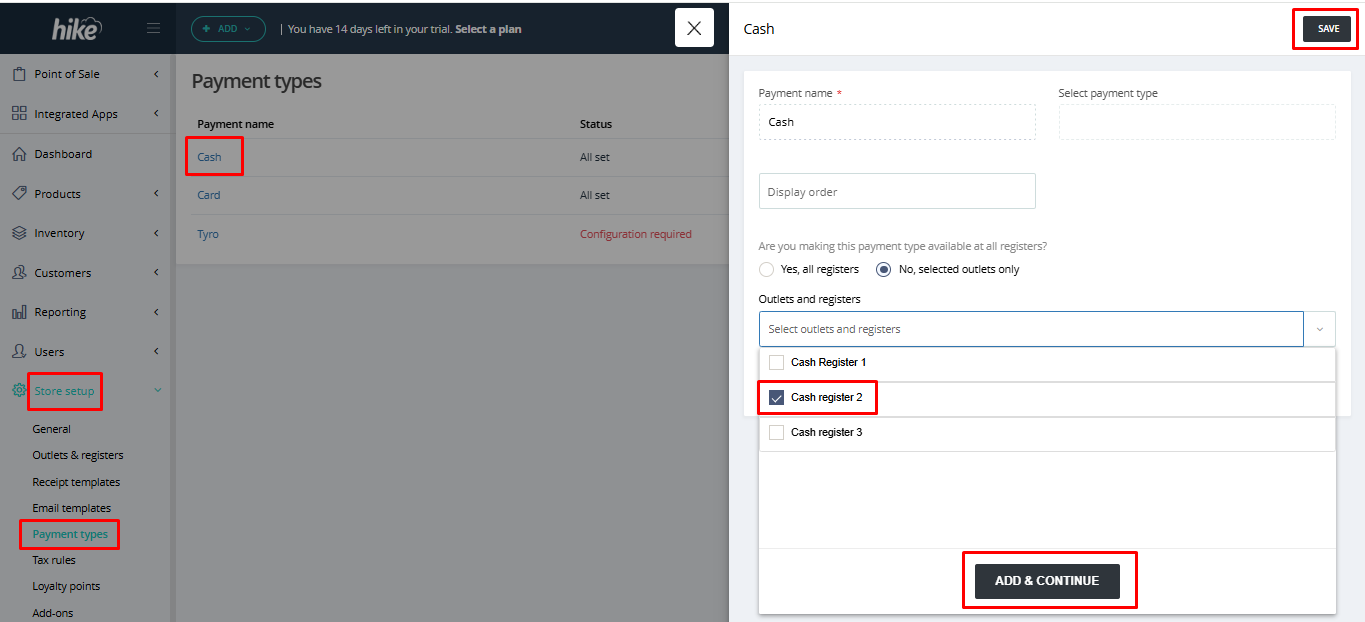
  1. Navigate to Store Setup from the left menu in your Hike account.
  2. Select Payment Types under the Store Setup section.
  3. Edit the Desired Payment Type
  4. Click on the payment type you wish to configure (e.g., Cash).
  5. Select Register Availability.
  6. Choose “No, selected outlets only” under "Are you making this payment type available at all registers?"
  7. Then click on “Select outlets and registers” and choose the relevant outlet and register (e.g., Melbourne Store, Cash Register 2).
  8. Click on Add & Continue button.
  9. Once the required registers are selected, hit the Save button on the top-right to apply the changes.

What Happens if the Payment Type Is Not Assigned to that register?

You will not see the float option when opening the register if cash payment is not active for this register.

You won’t get option to view or select the payment type on POS screen.

    • Related Articles

    • Creating Payment Types in Hike

      Whilst retail stores are most commonly outfitted with cash and card payment types, modern economy has seen the rise of integrated card payments, where sales are made via a third-party card terminal. Hike integrates with leading payment providers ...
    • How to integrate Castles Lloyds Cardnet payment type with Hike

      Hike provide an integration into Lloyds Bank Cardnet; a Payment Service Provider (PSP) operating in the UK. This guide will provide insight into connecting to the Castles Saturn 1000 range of devices <br> The Castles connection via ...
    • Creating & Assigning Customer Groups (Tiers)

      Customer groups are a popular way for retailers to set different levels of prices and/or discounts to a specific set of customers. These groups might include: VIP Customers Wholesalers Cross Promotion with Members of a Club First 100 Customers Retail ...
    • How to configure Hike with EVO Payment

      Hike supports integration with EVO payment on PC, Mac, iPad and Anroid tablet. The integration is supported in US. You can easily configure the integration between Hike and EVO. The terminal supported is Dejavoo Z9. Before you start the process, ...
    • How to configure Hike with Moneris Payment

      You can easily configure the integration between Hike and Moneris via the eConduit gateway. The integration is supported in Canada. Before you start the process, please make sure your terminal and your PC/Mac/iPad connected to the same Internet ...