Hike POS Support for Fiji e‑Invoicing & Tax Compliance
As Fiji moves toward mandatory e‑invoicing, Hike POS is being updated to ensure full compliance with the Fiji Revenue and Customs Service (FRCS) requirements.
A key part of this compliance is that Hike POS will never use manually entered tax rates. Instead, all tax rates must come directly from the official government systems: E‑SDC and V‑SDC.
A key part of this compliance is that Hike POS will never use manually entered tax rates. Instead, all tax rates must come directly from the official government systems: E‑SDC and V‑SDC.
This article explains how tax data flows into Hike POS, how tax categories and rates are structured, and what this means for your daily operations.
How Hike POS Gets Tax Rates for Fiji:
Hike POS does not allow users to create or edit tax rates manually for Fiji‑compliant clients. Instead, the system fetches all active tax rates from a government-authorized endpoint.
GET /api/v3/tax-rates
This endpoint returns the exact tax categories and rates as defined by the FRCS through the E‑SDC (E‑Service Delivery Centre) and V‑SDC (VAT Service Delivery Centre).
What This Means for Fiji Hike users:
No manual tax entry – You cannot add, edit, or delete tax rates inside Hike POS.
Always up to date – When the government changes a tax rate (e.g., VAT from 9% to 10%), Hike POS automatically uses the new rate after the API updates.
Single source of truth – Every sale, invoice, and e‑invoice uses the same tax rates that the FRCS expects.
Understanding Tax Categories & Rates in Hike POS:
The API returns two levels of tax information: Tax Categories and Tax Rates (sometimes called Tax Labels).
Tax Categories
Tax Rates (Labels)
Within a tax category, there can be multiple Tax Rates (often referred to by a Label). Each rate has a percentage and a short code.
Example from Hike POS (based on API response)
Below is a real example of how tax data appears inside Hike POS after being fetched from /api/v3/tax-rates:
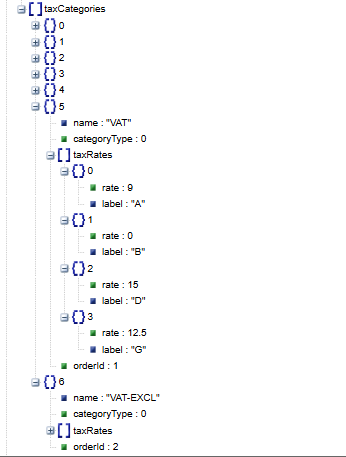
Tax Category: VAT (categoryType: 0)
How This Appears in Hike POS Interface
When you create a product or complete a sale, you will see tax options named like:
VAT - A (9%)
VAT - B (0%)
VAT - D (15%)
VAT - G (12.5%)
VAT-EXCL (exempt)
You cannot change the rate or label. You can only select which one applies to a given product or transaction.
Important: For Fiji clients, Hike POS will only show tax rates that come from the /api/v3/tax-rates endpoint. No other tax rates were allowed excepts from the ones received from E-SDC or V-SDC.
Hike has the possibility of adding the new labels in future if they are introduced by the Fiji tax authorities.