Using Embedded Barcodes for Goods in Hike POS
Overview
If you’re a retailer packaging and selling bulk goods, Hike allows you to scan or manually enter barcodes embedded with weight data directly into the Sell Screen. This feature automatically populates the quantity (weight) of items, streamlining checkout for bulk products.
Currently, no activation or setting is required to activate this feature. If you print the bar-code from your weigh-scale using correct format, it should scan and work with Hike.
FAQ
If you’re a retailer packaging and selling bulk goods, Hike allows you to scan or manually enter barcodes embedded with weight data directly into the Sell Screen. This feature automatically populates the quantity (weight) of items, streamlining checkout for bulk products.
Currently, no activation or setting is required to activate this feature. If you print the bar-code from your weigh-scale using correct format, it should scan and work with Hike.
Key Features
Scan or type UPC-A or EAN-13 barcodes with embedded weight.
Automatically populate prices or quantities in the Sell Screen.
Supported Barcode Formats
Hike supports two formats for embedded barcodes at the moment:
UPC-A: 12-digit barcodes.
EAN-13: 13-digit barcodes.
FAQ
1. Can Retail POS update prices in my scale system?
No. To sync price changes with scales, you’ll need to build an integration using the Hike API. Contact our developer team for API documentation.
2. Can I use scales at the point of sale?
No. Hike Retail POS only supports scanning pre-weighed items or printed labels. Scales cannot be connected directly.
3. Can I configure price/weight settings per product?
No. The Price Embedded or Weight Embedded mode is a global setting. Already active and available for all customers.
4. What are embedded barcodes?
Embedded barcodes start with 2, 20, or 02 and encode price/weight in the digits. They are usually set in this format: YYCCCCCPPPPPX
YY: MUST be 20, 02, or just 2
CCCCC is the SKU
PPPPP Weight is divided by 1000 (02000 becomes 2.000 quantity)
X is the check digit, and must be valid according to EAN/UPC spec. (This is automatically generated and the printing scales should add this themselves.)
For example:
YY: MUST be 20, 02, or just 2
CCCCC is the SKU
PPPPP Weight is divided by 1000 (02000 becomes 2.000 quantity)
X is the check digit, and must be valid according to EAN/UPC spec. (This is automatically generated and the printing scales should add this themselves.)
For example:
Weight embedded bar-code: 2012345005006
SKU: 12345 | Weight: 00500 ÷ 1,000 = 0.5 Kg
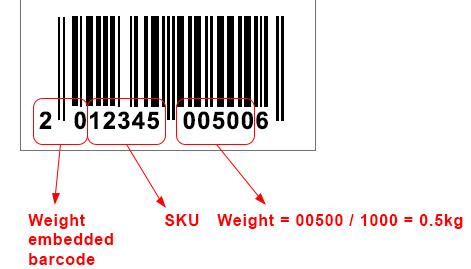
Please note that if the bar-codes are not created as per the above format, it will not work correctly within Hike.